
Understanding Cache and Reindex Management
This includes a guide to clearing cache if required
Data on the marketplace is stored in the database, however at times - information may not be as updated on the customer facing view. The reason is that the information or page displayed to the customer view could be either cached, or require reindexing.
Cache
Why are pages cached?
Caching occurs to help speed up the web page load speeds for customers. The server will take a 'snapshot' (or a cached version) of the pages when someone visits them. This will keep the styling, some data and images to make it faster to load for the next user that visits the same page.
The cache typically expire 24 hours after a viewer's first visit of the page. After the page cache expires, the next person who visits this will see the most updated content at that time, and another cache is created for the next 24 hours. This prevents all viewers from having to load directly from the server, all of the CSS and Images and take up the server's resources.
In summary, it takes load from the server and displays the content faster for viewers.
How does cache get cleared if we need to clear it immediately?
When there is no cache for the first visitor, it takes generally 24 hours from that first visit for the cache to expire (there is no cron job / scheduled task to clear cache).
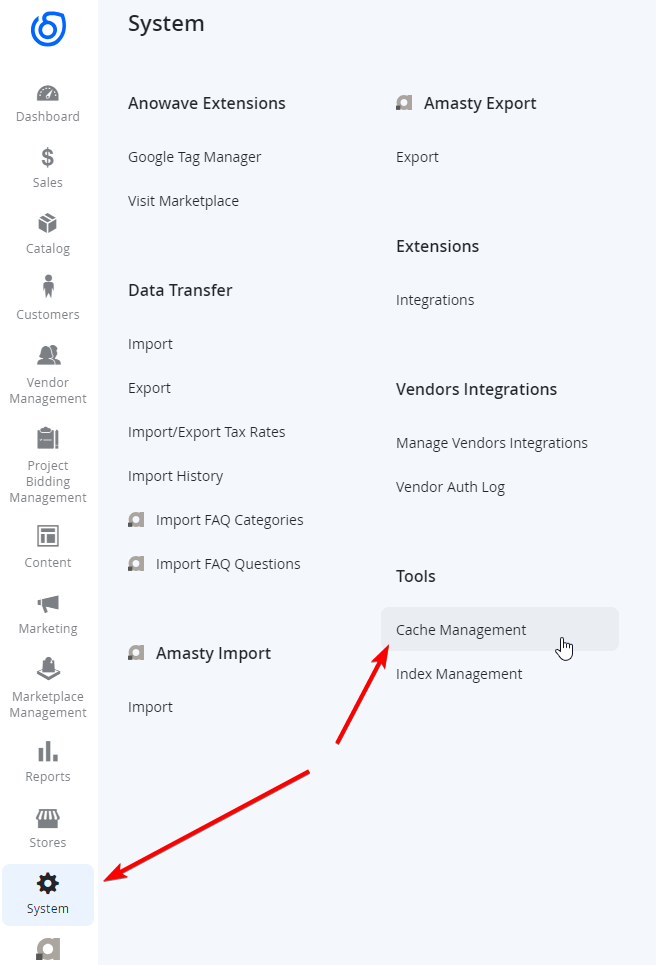
If you need to clear the cache sooner, as an administrator, navigate to System > Tools > Cache Management. This is only accessible to those with Administrator privileges, not vendors)
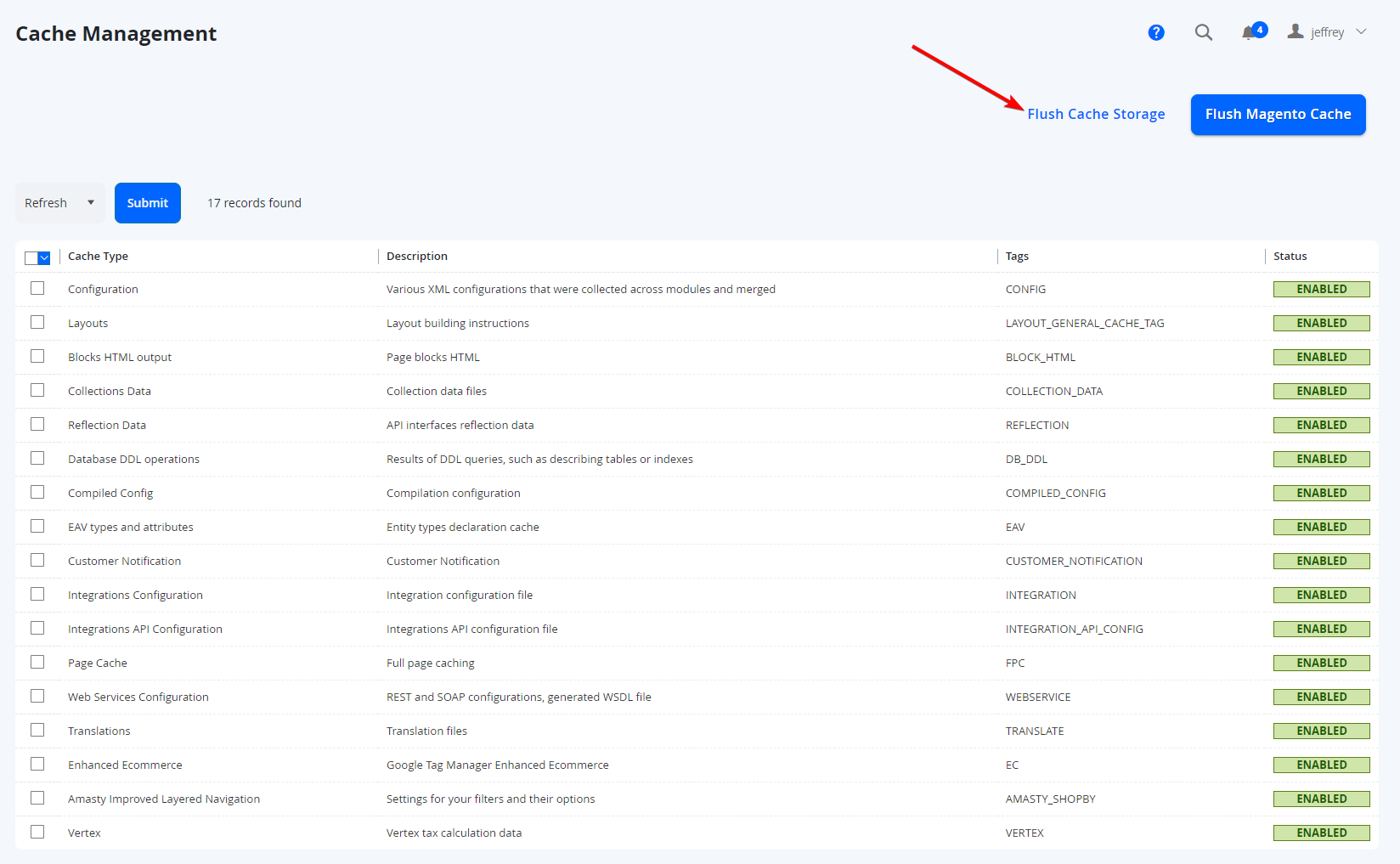
Select Flush Cache Storage from this page. This will clear Magento Cache, and any other cache (eg Varnish Cache) if applicable.
NOTE:
There are times where the browser can also take it's own snapshot of the page, this is known as Browser Cache and is controlled by each individual user. There is no way to clear this on behalf of the viewers.
NOTE:
Only clear the cache manually during non-busy periods. Clearing cache may take up some resources from the server, and if the website has a lot of traffic / activity, users may encounter site speed slowness, or even site outage if too much resources are consumed during the cache clear - so ensure you do not perform this during high traffic periods such as sale times.
NOTE:
There are a variety of different caches available, some optimise load speeds and serve content in different ways. For example, Full Page Cache (the general cache we refer to for a page) and Varnish Cache (another caching service used to serve content faster. Using the Flush Cache Storage will clear all these caches (including Magento Cache specified in the Cache Management page).
Will new pages come up instantly?
Yes, pages that are created will immediately appear and is accessible via URL. New pages will not have had any cache, and as nobody would have visited them yet. Once someone (including yourself) visits the page at the front end, it will then be cached for 24 hours from that point.
NOTE:
This does NOT necessarily mean that any links from existing pages or menu items will appear immediately - only the page itself will be available straight away. You may still need to Flush Cache Storage to have the pages / links appear on existing pages to link to the new page you had created.
Reindexing
Why does some data require indexing?
The data is stored in flat tables in the database, which essentially is built to ensure faster queries run faster (less database tables to join together allowing for faster results. The method of updating the data on the front end may require reindexing, which behaves differently from how page caches do.
How often is data reindexed?
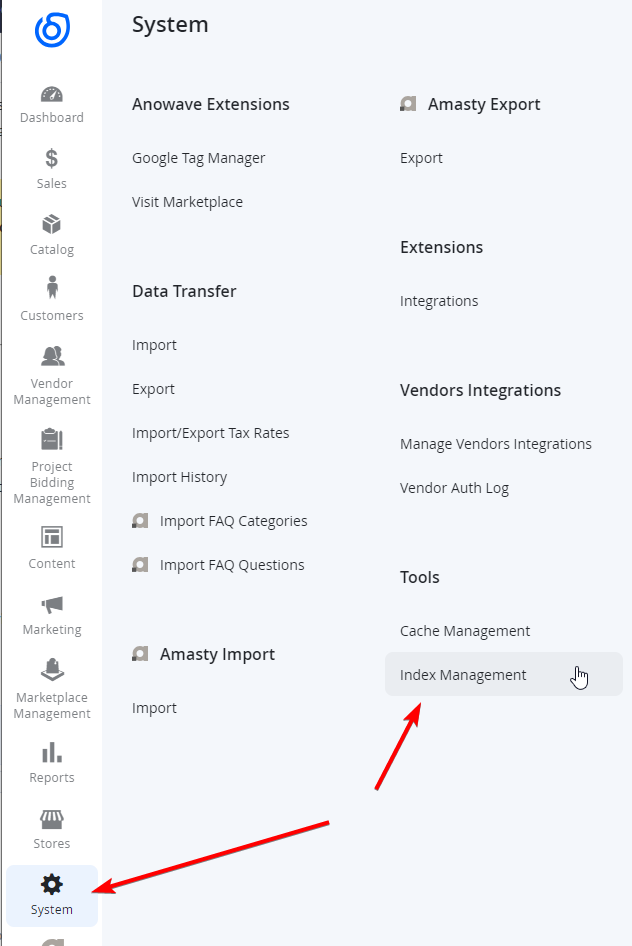
Typically data is reindexed every 5 minutes - though this can vary between different environments and marketplaces. This is controlled by a scheduled task known as a cron job. The cron job will run through all the items available to reindex in a queue. You can see from the back end what indexes are scheduled, and what is updated on save, by navigating to System > Tools > Index Management.
Can I reindex items myself?
At this point in time, please do not reindex any items manually as this will take a lot of resources if there is a lot of data in the database and may cause some timeouts/errors/outages.
NOTE:
There is one exception which is the Content Post line, which can be reindexed manually, however it is best not to reindex too often (only applicable for non-glyde front ends and where Content Post module is being used).
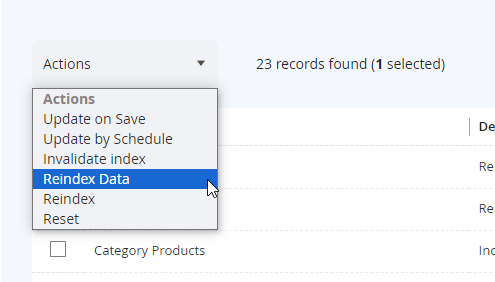
From the Index Management (Under System > Tools > Index Management), select the tick box next to Post Flat Data on the left. From Actions at the top left of the page, select Reindex Data. Ensure this is the only item you have selected.
You will only ever need to reindex this IF the Status is Invalidated. Apart from that, if the Mode is set to Update on Save, then this should update automatically in time.

Always consult your Project / Support Manager if a reindex is required for any other items.
Updated 9 months ago