
4. Set Up - Adding dimensions to your products for Easyship
Our Easyship Integration allows the marketplace to automatically calculate the shipping rates for the available couriers, based on the physical dimensions, weight and shipping category of the products.
When adding/editing your products, there are essentially 5 Product Attributes that you need to populate in order for the products to be eligible to ship.
- Weight

-
Omnyfy Dimension Length, Width, and Height (used for Easyship specifically)

-
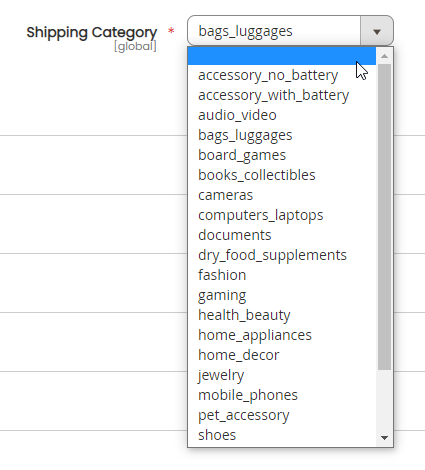
Shipping Category
The unit of measurement for Weight and Dimension is based on the Locale (eg if the marketplace is using Australian Locale, then the units for weight would be in kg, and the dimensions would be in cms. However if the marketplace is using American Locale, then the measurements would be in lbs for weight, and inches for dimensions. If the marketplace is using Australian Locale, but the Easyship account is American, then the dimensions would be converted from kg to lbs, and cms to inches in Easyship.
Regarding the shipping category, depending on what you select, will determine the price and availability for couriers. If you cannot find the relevant category, you can choose the closest category available.
You can always import these values in using the import sheet too.
Updated 6 months ago