
Connecting a Salesforce Account to the Marketplace via Fuse
Credentials Required from Platform
Here is the information needed to provide to the UC Support / Project team so that the platform may be connected to the Marketplace.
- API Auth URL
- API URL
- API Version
- Client ID / Consumer Key
- Client Secret / Consumer Secret
- Username
- Password
Obtaining Credentials from Salesforce
Some of these fields, they can be found from the Salesforce Admin Portal or App Manager. This integration requires a Connected App enabled with the correct roles and configuration.
API Auth URL, API URL, and API Version
- API Auth URL: This will typically be https://login.salesforce.com so this shouldn't need to be changed.
- API URL: You can locate your Salesforce API base URL in either of the following ways:
- Setup > My Domain > Current My Domain URL
- Or directly under your username in View Profile
This URL is used as the base for all REST API endpoints.
- API Version: To check the latest available API version, you can:
- Open the following in your browser:
https://(your-domain).my.salesforce.com/services/data/
(the first entry represents the newest API version) - Or refer to Salesforce’s REST API documentation:
https://developer.salesforce.com/docs/atlas.en-us.api_rest.meta/api_rest/intro_rest.htm
- Open the following in your browser:
Client ID and Secret (Consumer Key and Secret)
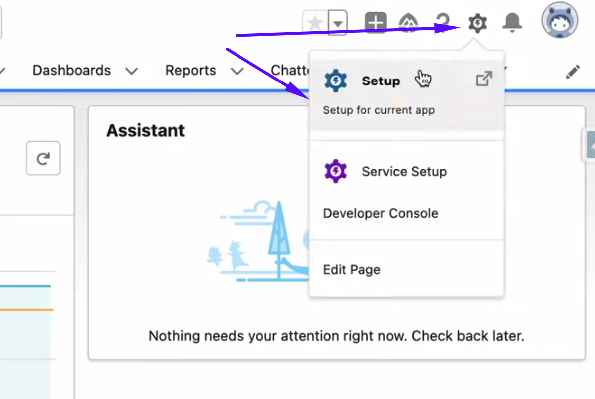
This can be in the Connected App. When logged in to Salesforce, navigate to the top right gear icon for Setup.
You will be taken to the Setup Home, and on the left, you can search for App Manager.
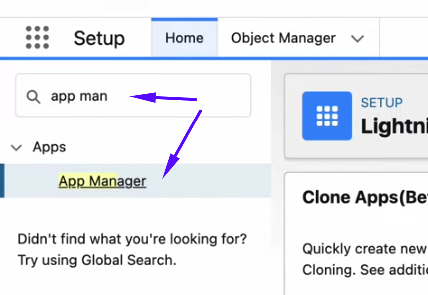
You can either create or edit an existing connected app. If you have an existing app, navigate to the dropdown from this grid and select View.

From the app details page, navigate down to the API (Enable OAuth Settings) section and select Manage Consumer Details.
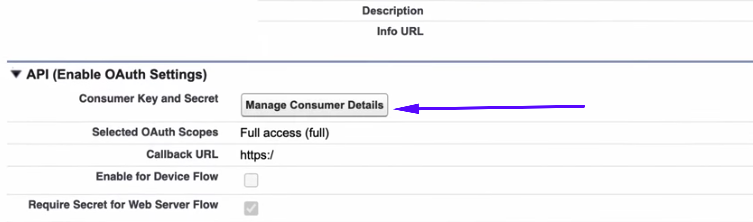
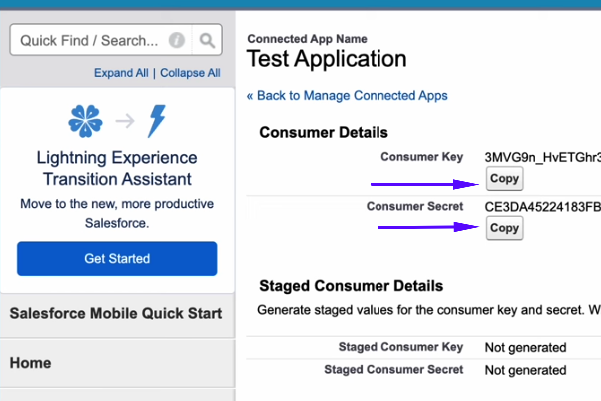
This may require ID Verification. Once the Verification is confirmed, you can obtain the following:
- Consumer Key (Client ID)
- Consumer Secret (Client Secret)
Username / Password
This will be for the Salesforce Account (you may create a specific API User Account if you wish).
Connected App Configuration
When configuring a Connected App, OAuth Scopes are required to be configured within this app. The only scope required for our integration is:
- api — provides access to standard and custom objects via REST API
If the api scope does not appear in the Available OAuth Scopes list, this simply means it is enabled by default (common in Developer Edition orgs).
Our integration does not use a Callback URL. Since we obtain access tokens via a non-interactive OAuth Username–Password flow, the Callback URL is not invoked and therefore does not play any role in this integration - so if this is a required field, this can just be populated with any URL.
Order Details in Salesforce
When an order is placed on the Marketplace for vendors connected with Salesforce - it will come through with the customer and order details from the platform.
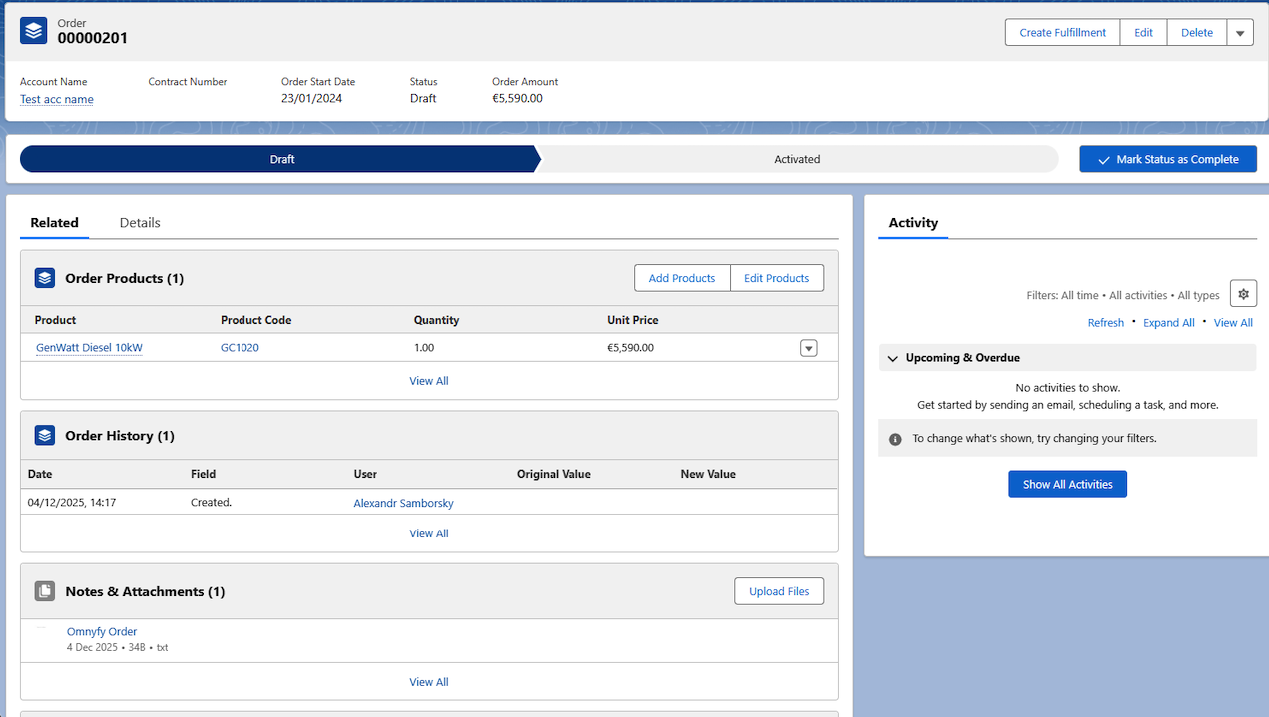
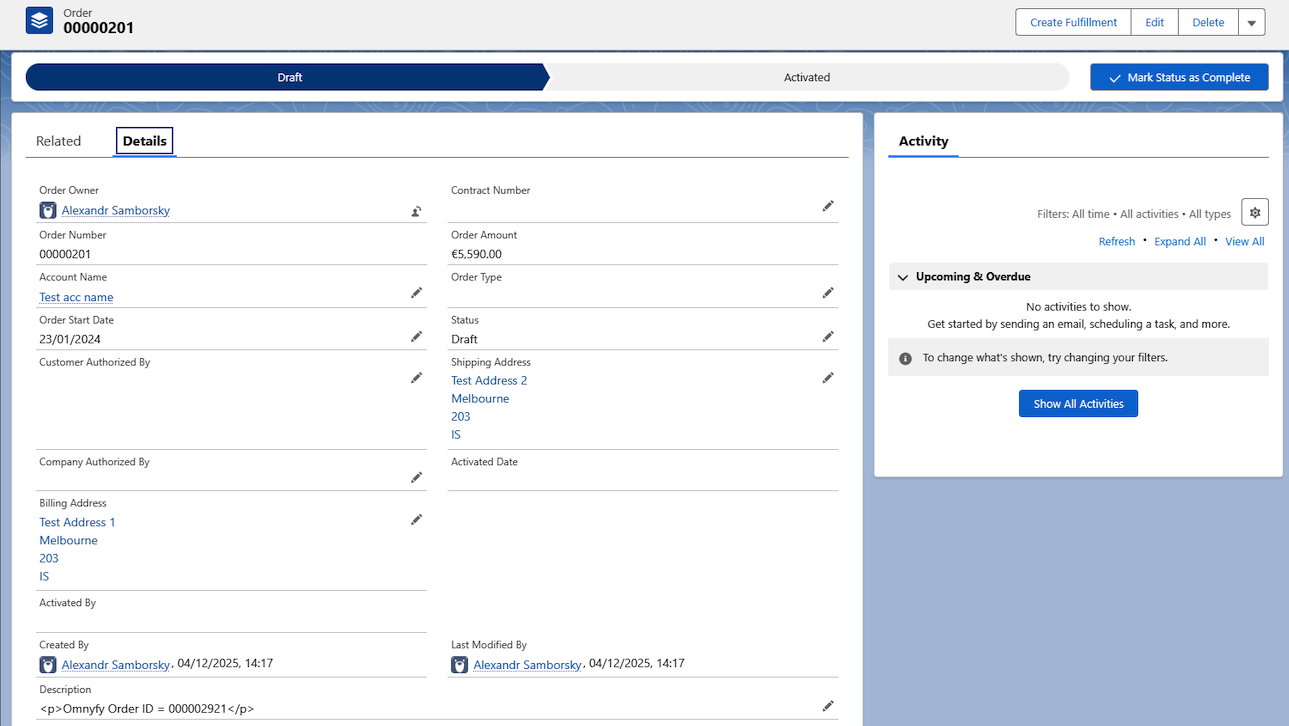
The Details tab in the order view will include the reference to the Marketplace Order ID in the description:

This should match the Order ID in the Marketplace Orders page.
NOTE:
Reminder that there is currently no fulfilment integration with the Marketplace and Salesforce. To fulfil this order, actions need to be updated in Salesforce separately, whilst also updating the Marketplace Admin Portal to update the shipping steps.
What happens next?
Ultra Commerce will connect your store via our integrator application and Fuse, and begin to sync products to the Marketplace. The UC team will then advise when this has been connected, and you can map the data when ready.
Updated 10 months ago